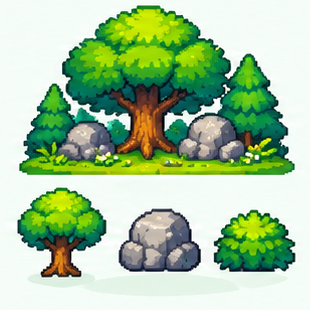
Why Developers Use This Tool
01
Automatic Object Detection
Finds disconnected sprites via connected-component analysis on transparent scenes.
02
Exact Bounding Boxes
Crops every tree, rock, prop, or UI element cleanly without clipping.
03
Batch ZIP + Manifest
Downloads all extracted PNG objects plus a manifest.json with original coordinates.
04
100% Client-Side Processing
Fast local extraction directly in the browser with zero upload delay.
How to Use
- 1Upload a transparent PNG containing multiple objects or scene props.
- 2Click Generate / Extract to detect every separate connected sprite.
- 3Review each extracted object and its bounding coordinates.
- 4Download the scene-objects.zip archive with individual PNGs and manifest.json.
Engine-Ready Output
Drop straight into your favorite 2D game engine




Frequently Asked Questions
How does Scene Sprite Extractor detect separate objects?
It uses connected-component analysis on opaque pixels to isolate each non-touching sprite.
What is included in the ZIP download?
Individually cropped transparent PNG files (object-01.png, object-02.png, ...) and a manifest.json recording original coordinates.
Does it work on sprites with semi-transparent shadows?
Yes, non-zero alpha pixels are grouped cleanly into each object bounding box.